Audio Realtek
(Download) (Mirror)
Bluetooth Broadcom
(Download)
Webcam Bison
(Download)
Webcam Suyin
(Download)
Card Reader O2
(Download)
LAN Driver
(Download)
Modem Driver
(Download)
TouchPad Synaptics
(Download)
VGA Ati Radeon HD 2300
(Download)
VGA Intel
(Download)
Wireless Intel
(Download)
Tuesday, December 23, 2008

Acer Aspire M1200 M1201 M3200 M3201 M5200 M5201 XP Drivers
Acer Aspire 5735 - 5735Z Windows XP Drivers
INTEL CHIPSET:
Chipset Intel
(Download) (Mirror)
VGA/GRAPHICS/VIDEO:
VGA Intel
(Download) (Mirror)
WEBCAM DRIVERS:
(note: there are several issue might appear such as onlione webcam so here choose the proper driver and if you didn't know which to choose i suggest to install suyin)
Webcam Suyin
(Download) (Mirror)
Webcam Bison
(Download) (Mirror)
WIRELESS DRIVERS:
if you have attheros:
Wireless Atheros XB63
(Download)
Wireless Foxconn Atheros AR5B91
(Download) (Mirror)
Wireless Foxconn Ralink
(Download) (Mirror)
if you have broadcom
Wireless Broadcom
(Download) (Mirror)
Wireless Intel Shirley Peak
(Download)
Wireless QMI Atheros AR5B91
Windows XP Acer Aspire 5735 - 5735z
(Download) (Mirror)
(note: choose one only base on your specs if you have Intel make it strongly recommended to isntall microsoft windows installer 3.1)
BLUETOOTH
Bluetooth Broadcom
(Download)
AUDIO DRIVER
Realtek Audio Driver
(Download)
CARD READER
Card Reader Realtek
(Download)
MODEM
Modem Foxconn Conexant
Windows XP Acer Aspire 5735 - 5735z
(Download) (Mirror)
Modem Foxconn LSI
Windows XP Acer Aspire 5735 - 5735z
(Download) (Mirror)
LAN/ETHERNET
LAN Marvell
Windows XP Acer Aspire 5735 - 5735z
(Download) (Mirror)
OTHERS
Launch Manager
Windows XP Acer Aspire 5735 - 5735z
(Download) (Mirror)
Touchpad Synaptics
Windows XP Acer Aspire 5735 - 5735z
(Download) (Mirror)
Intel Matrix Storage Manager
Windows XP Acer Aspire 5735 - 5735z
(Download)
original source: http://komku.blogspot.com/
Chipset Intel
(Download) (Mirror)
VGA/GRAPHICS/VIDEO:
VGA Intel
(Download) (Mirror)
WEBCAM DRIVERS:
(note: there are several issue might appear such as onlione webcam so here choose the proper driver and if you didn't know which to choose i suggest to install suyin)
Webcam Suyin
(Download) (Mirror)
Webcam Bison
(Download) (Mirror)
WIRELESS DRIVERS:
if you have attheros:
Wireless Atheros XB63
(Download)
Wireless Foxconn Atheros AR5B91
(Download) (Mirror)
Wireless Foxconn Ralink
(Download) (Mirror)
if you have broadcom
Wireless Broadcom
(Download) (Mirror)
Wireless Intel Shirley Peak
(Download)
Wireless QMI Atheros AR5B91
Windows XP Acer Aspire 5735 - 5735z
(Download) (Mirror)
(note: choose one only base on your specs if you have Intel make it strongly recommended to isntall microsoft windows installer 3.1)
BLUETOOTH
Bluetooth Broadcom
(Download)
AUDIO DRIVER
Realtek Audio Driver
(Download)
CARD READER
Card Reader Realtek
(Download)
MODEM
Modem Foxconn Conexant
Windows XP Acer Aspire 5735 - 5735z
(Download) (Mirror)
Modem Foxconn LSI
Windows XP Acer Aspire 5735 - 5735z
(Download) (Mirror)
LAN/ETHERNET
LAN Marvell
Windows XP Acer Aspire 5735 - 5735z
(Download) (Mirror)
OTHERS
Launch Manager
Windows XP Acer Aspire 5735 - 5735z
(Download) (Mirror)
Touchpad Synaptics
Windows XP Acer Aspire 5735 - 5735z
(Download) (Mirror)
Intel Matrix Storage Manager
Windows XP Acer Aspire 5735 - 5735z
(Download)
original source: http://komku.blogspot.com/
Saturday, September 6, 2008
System restore
If yesterday your laptop works well but now it lost some function/ or affected by virus/ or having problems like unstable system = system restore is one of the best options you can choose to try solve the problems.
How to do it?
Click start > all program >accessories > system tools > system restore.
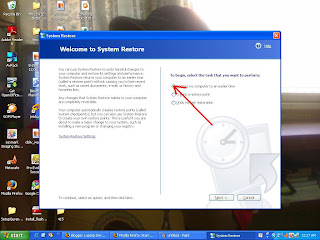 And then after clicking next you will see many date where you can choose to restore. Choose any of them(for me choose the date where computer in good performance is better).
Remember to back up your files in C.
what is the effect: It UNDO the change made to your system and restore the earlier system.
How to do it?
Click start > all program >accessories > system tools > system restore.
 And then after clicking next you will see many date where you can choose to restore. Choose any of them(for me choose the date where computer in good performance is better).
Remember to back up your files in C.
what is the effect: It UNDO the change made to your system and restore the earlier system.
Compaq Presario V3828AU driver for xp
NVIDIA nForce 630M Chipset:
http://us.download.nvidia.com/Windows/nForce/650i/8.43_nforce_650i_winxp...
Video: NVIDIA GeForce 7150M:
http://drivers.softpedia.com/get/GRAPHICS-BOARD/NVIDIA/NVIDIA-32bit-Forc...
OR
http://us.download.nvidia.com/Windows/163.71/163.71_forceware_winxp_32bi...
NOTE: The URL above will take you to a non HP Web site. HP does not control and is not responsible for information outside of the HP Web site.
Alps Touchpad Driver Download link:
ftp://ftp.hp.com/pub/softpaq/sp36501-37000/sp36510.exe
HP Quick Launch Buttons:
ftp://ftp.hp.com/pub/softlib/software8/COL18360/ch-47422-1/sp33258.exe
Ricoh 5-in-1 Card Reader Host Controller:
ftp://ftp.hp.com/pub/softpaq/sp32501-33000/sp32825.exe
Broadcom Wireless LAN Driver:
ftp://ftp.hp.com/pub/softpaq/sp31001-31500/sp31466.exe
Network Drivers ( LAN) :
http://www.sendspace.com/file/4s15q0
Alternate network Drivers: Realtek RTL8139/810x Family Fast Ethernet NIC
ftp://ftp.hp.com/pub/softpaq/sp36001-36500/sp36407.exe
Or
ftp://ftp.hp.com/pub/softpaq/sp32001-32500/sp32131.exe
Installation Instructions :
1. Download the file to a directory on your hard drive.
2. Execute the downloaded file and follow the on-screen instructions.
3. Restart the notebook when the installation is complete.
Audio Driver:
In order to install the High definition audio driver we must install Microsoft HD driver. Microsoft Universal Audio Architecture (UAA) Bus Driver for High Definition Audio :
ftp://ftp.hp.com/pub/softpaq/sp33501-34000/sp33566.exe
NOTE: Please do not click on the link. Copy the full link and paste it to
the address bar of a new browser Window and try to open it.
Installation Instructions
1. Download the file to a directory on your hard drive.
2. Execute the downloaded file and follow the on-screen instructions.
Then restart the notebook to install Audio driver
Conexant High Definition Audio Drive:
ftp://ftp.hp.com/pub/softpaq/sp36001-36500/sp36408.exe
Note: Please copy the entire link starting from "ftp" to "exe" and paste it in the address bar of the browser in your computer and press enter.
1. Click on Start and select Run. Now type devmgmt.msc and press enter.
2. Right click on "Audio device on High Definition Audio Bus" and click Update driver.
3. Select "Install from a list or specific location"
4. Click Next. Then select "Don't search, I will choose the driver to install"
5. Click Next and then select "Sound, video and game controller" from the list.
6. Click Next and then click Have Disk.
7. Click Browse C:\swsetup\sp36408 folder and the double click the V32 folder. Select the .inf file, click open and Continue with the onscreen instructions.
Similarly install Modem Drivers:
Conexant HDAUDIO Soft Data Fax Modem with SmartCP drivers:
ftp://ftp.hp.com/pub/softpaq/sp33501-34000/sp33890.exe
1. Right click on "Modem device on High Definition Audio Bus" and click Update driver.
2. Select "Install from a list or specific location"
3. Click Next. Then select "Don't search, I will choose the driver to install"
4. Click Next and then select "Modem" from the list.
5. Click Next and then click Have Disk.
6. Click Browse C:\swsetup\sp33890 folder and select the .inf (wis30b2b) file and click open and Continue with the onscreen instructions.
Software and Drivers for HP Integrated Module with Bluetooth Wireless :
ftp://ftp.hp.com/pub/softpaq/sp32501-33000/sp32883.exe
CyberLink YouCam :
http://www.cyberlink.com/multi/download/trials_125_ENU.html
Installation Instructions :
1. Download the spXXXXX.EXE file to a directory on your hard drive.
2. Execute the downloaded file and follow the on-screen instructions.
3. Restart the notebook when the installation is complete.
original source: http://www.zyxware.com
Compaq Presario A901TU drivers for xp
You may either click the given link or copy and paste them on to a new browser to download the drivers. Neither HP-Compaq nor Zyxware gives you any guarantee that these drivers will work well on your laptop.
Inorder to detect Audio device on your notebook, first we need to install Microsoft Universal Audio Architecture (UAA) Bus Driver then install the Audio driver.
Microsoft Universal Audio Architecture (UAA) Bus Driver:
ftp://ftp.hp.com/pub/softpaq/sp32501-33000/sp32646.exe
Conexant High-Definition Audio Driver:
ftp://ftp.hp.com/pub/softpaq/sp35501-36000/sp35682.exe
Conexant HDAUDIO Soft Data Fax Modem with SmartCP Driver:
ftp://ftp.hp.com/pub/softpaq/sp33001-33500/sp33050.exe
Intel Chipset Installation Utility Driver:
ftp://ftp.hp.com/pub/softpaq/sp36501-37000/sp36880.exe
Mobile Intel 965 Express Chipset Family Graphics Media Accelerator Driver:
http://www.intel-drivers.com/Download.asp?ID=90992&Url=http://downloadmi...
NOTE: The weblink above will take you to a non-HP Website. HP does not control and is not responsible for information outside of the HP Website.
ALPS Touchpad Pointing Device Driver:
ftp://ftp.hp.com/pub/softpaq/sp31001-31500/sp31075.exe
Wireless LAN Drivers
Intel PRO/Wireless Drivers:
ftp://ftp.hp.com/pub/softpaq/sp38001-38500/sp38439.exe
Or
Broadcom Wireless LAN Driver:
ftp://ftp.hp.com/pub/softpaq/sp34001-34500/sp34152.exe
Or
Atheros AR5007 802.11b/g Wireless LAN Driver:
ftp://ftp.hp.com/pub/softpaq/sp27501-28000/sp27952.exe
Realtek RTL8139/810x Family Fast Ethernet NIC Driver:
ftp://ftp.hp.com/pub/softpaq/sp29501-30000/sp29875.exe
Intel Matrix Storage Manager:
ftp://ftp.hp.com/pub/softpaq/sp32001-32500/sp32492.exe
HP Wireless Assistant:
ftp://ftp.hp.com/pub/softpaq/sp36501-37000/sp36770.exe
Installation Instructions :
1. Download the spXXXXX.EXE file to a directory on your hard drive.
2. Execute the downloaded file and follow the on-screen instructions.
3. Restart the notebook when the installation is complete.
original source: http://www.zyxware.com
Subscribe to:
Posts (Atom)